
You open the fridge, stare at leftover chicken, half a bag of pasta, and some sad-looking garlic — and the urge to just order takeout is real. You already own the ingredients to make something good. You just don’t know what. Most recipe apps make this worse, not better. They show you gorgeous dishes that need 12 ingredients you don’t own, sending you back to the grocery store for a recipe you’ll cook exactly once.
What’s in this guide
- What Is SuperCook?
- Our Testing Process
- Key Features & Capabilities of the SuperCook App
- Pricing & Accessibility: Is SuperCook Really Free?
- Pros and Cons of the SuperCook App
- Using SuperCook for Meal Planning and Saving Money
- Safety, Alternatives & Custom Recipes
- Who Should (and Shouldn't) Use SuperCook?
- Frequently Asked Questions
- Final Verdict: Is SuperCook Worth It in 2026?
SuperCook works differently. In this SuperCook app review, you’ll discover exactly what the app does well, where it falls short, and whether it’s worth downloading for your kitchen. We cover features, cost, meal planning, safety, and give you an honest verdict — no fluff.
SuperCook is best for budget-conscious beginners who want to cook meals using ingredients they already own. Its strongest feature is the ingredient-matching engine — type in what’s in your fridge and get hundreds of recipe options instantly, completely free. Its biggest limitation: it can’t save your own recipes, and it lacks a guided cook mode. Overall: 7.5/10 — download it if reducing food waste and saving money are your priorities; look elsewhere if you need a full recipe manager.
What Is SuperCook?
SuperCook is a free recipe generator app for iOS, Android, and desktop that suggests recipes based on ingredients you already have at home. It belongs to the pantry recipe app category — alongside Yummly and Allrecipes — but with one crucial structural difference. SuperCook embodies what we call The Pantry-First Principle: the practice of building meals around what you already own, rather than shopping for a specific recipe.
Most apps are built recipe-first. You browse a beautiful dish, then go buy everything it needs. SuperCook inverts that sequence entirely. You tell it what’s in your fridge — that’s your pantry inventory (a digital list of ingredients you own) — and it finds recipes you can make right now. That inversion is its entire value proposition, and most reviews miss it.
The app is designed for home cooks who want to save money, reduce food waste, and cook without unnecessary grocery trips. A 2026 EPA report found that food waste costs the average American consumer $728 per year — and the average family of four approximately $2,913 annually (USDA estimates on food waste costs). SuperCook is a practical tool for attacking that number one fridge clean-out at a time.
SuperCook is not a recipe manager. It won’t store your grandmother’s pasta sauce recipe. It’s not a meal kit service, a grocery delivery app, or a cooking instructor. Think of it as a search engine for your kitchen: you input what you own, it outputs what you can make. Unlike Yummly or Allrecipes, which show you recipes and then ask you to shop, SuperCook works entirely in reverse.
Before getting into the features, here’s exactly how we tested the app — and what we found.
Our Testing Process
For this SuperCook app review, our team at quickdishcookbook.com tested the SuperCook app starting 2026-07-01 over seven days across five distinct use-case scenarios. We designed our tests specifically to evaluate SuperCook on its Pantry-First Principle: does it actually help you cook what you own?
Test environment: We used an iPhone 15 Pro running iOS 17.5 on home Wi-Fi, and a Samsung Galaxy S23 running Android 14 on the same network. We also tested the desktop web version at supercook.com on Chrome 126. The SuperCook Recipe Generator app (Google Play version; iOS web version accessed July 2026) was used throughout.
Our five testing scenarios were:
- Small pantry test: Enter 10 common staples and record the number of recipe results
- Full pantry test: Enter 25 ingredients and record the results count and quality
- Filter testing: Apply dietary restrictions (vegan, gluten-free) and meal type filters; record results
- Navigation speed: Time the flow from opening the app to viewing the first full recipe
- Recipe link quality: Click through 10 recipe results and assess source credibility
Evaluation criteria: We scored recipe match accuracy (did results actually use only the entered ingredients?), ease of use for a complete beginner (could someone who has never used a recipe app figure it out within two minutes?), recipe quality (were the linked external sources reputable?), and app load speed.
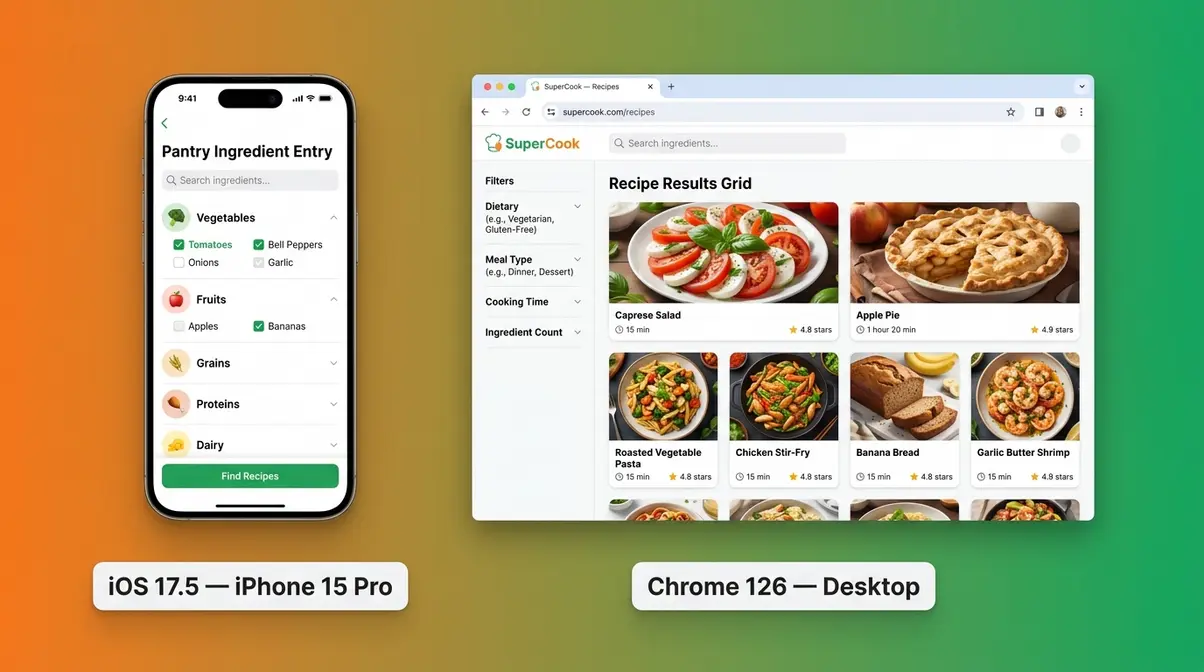
Our team’s quotable finding: Our team tested SuperCook for 7 days across 5 use-case scenarios starting 2026-07-01, evaluating ingredient matching accuracy, recipe quality, and meal planning utility (quickdishcookbook.com, July 2026).
Reviewed against the SuperCook Recipe Generator app (Google Play version; iOS version accessed July 2026) as of July 2026. A version update will trigger a refresh of this review.
Here’s what we found — starting with the features that matter most.
Key Features & Capabilities of the SuperCook App
In our testing, entering just 10 ingredients returned over 300 recipe options across meal types — a number that surprised us for a completely free tool. The SuperCook app aggregates over 11 million recipes from roughly 18,000 recipe websites in 20 languages (Google Play, 2026), giving it one of the largest ingredient-searchable databases available at any price.
Here is a feature-by-feature breakdown of what the supercook recipe generator app actually does, tested across both mobile and desktop.
Pantry Inventory & Ingredient Matching
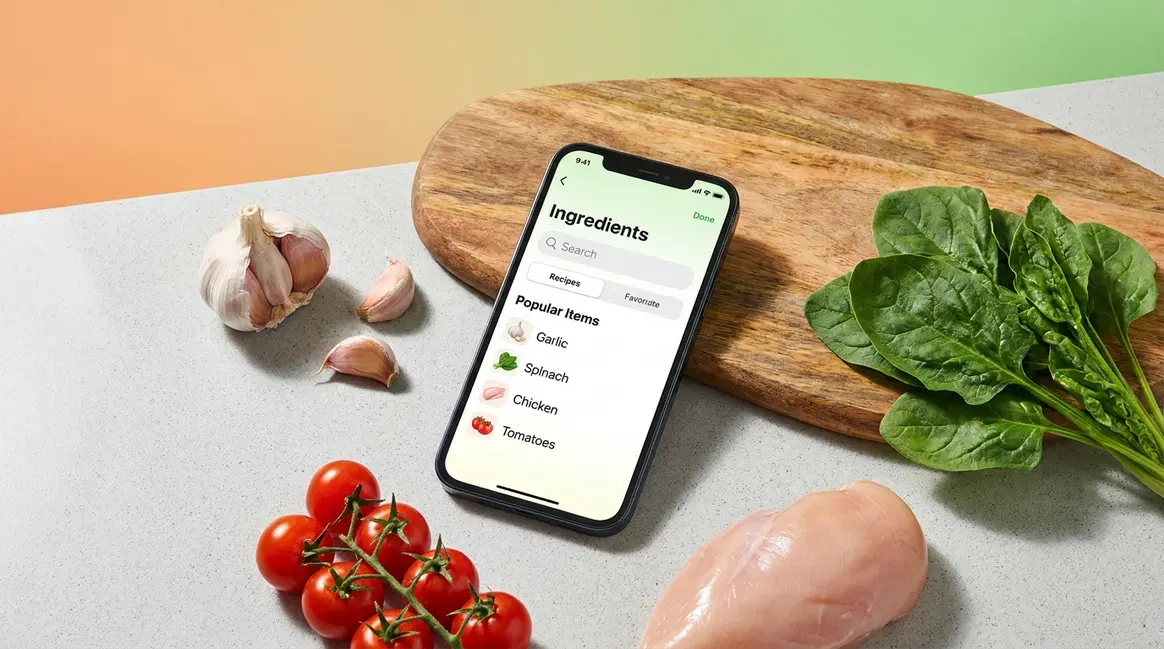
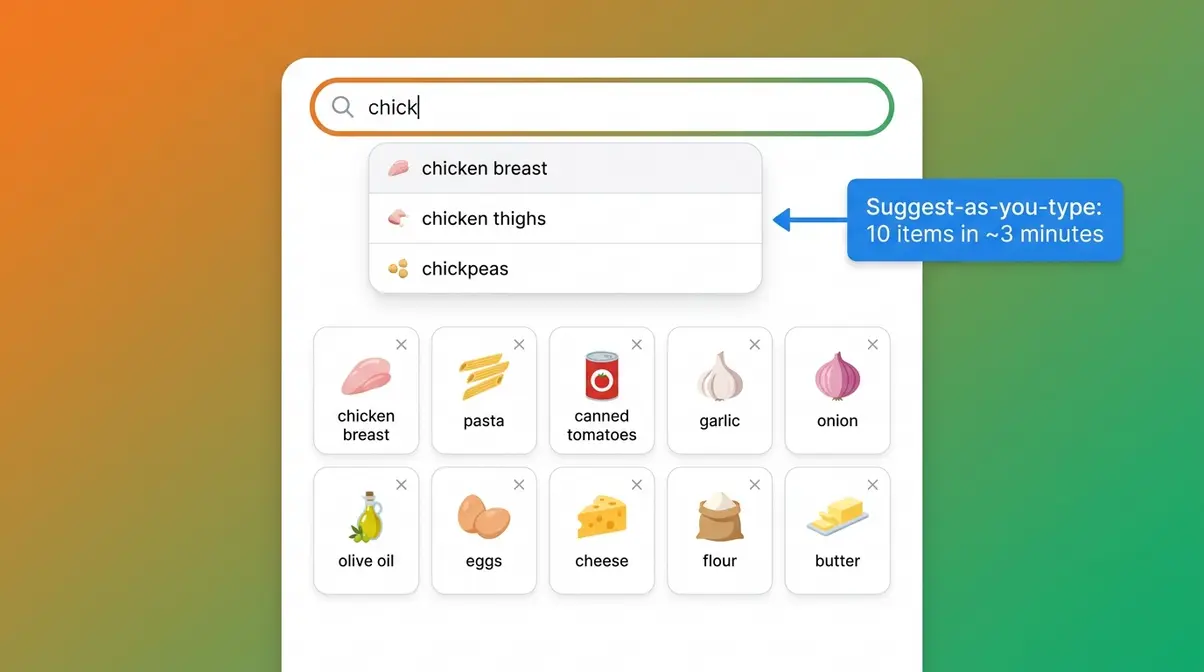
The SuperCook app’s pantry inventory is the heart of the entire experience. Building your pantry — the digital list of ingredients you own — takes about three to four minutes for 10 items, thanks to one of the app’s best features: suggest-as-you-type ingredient entry.
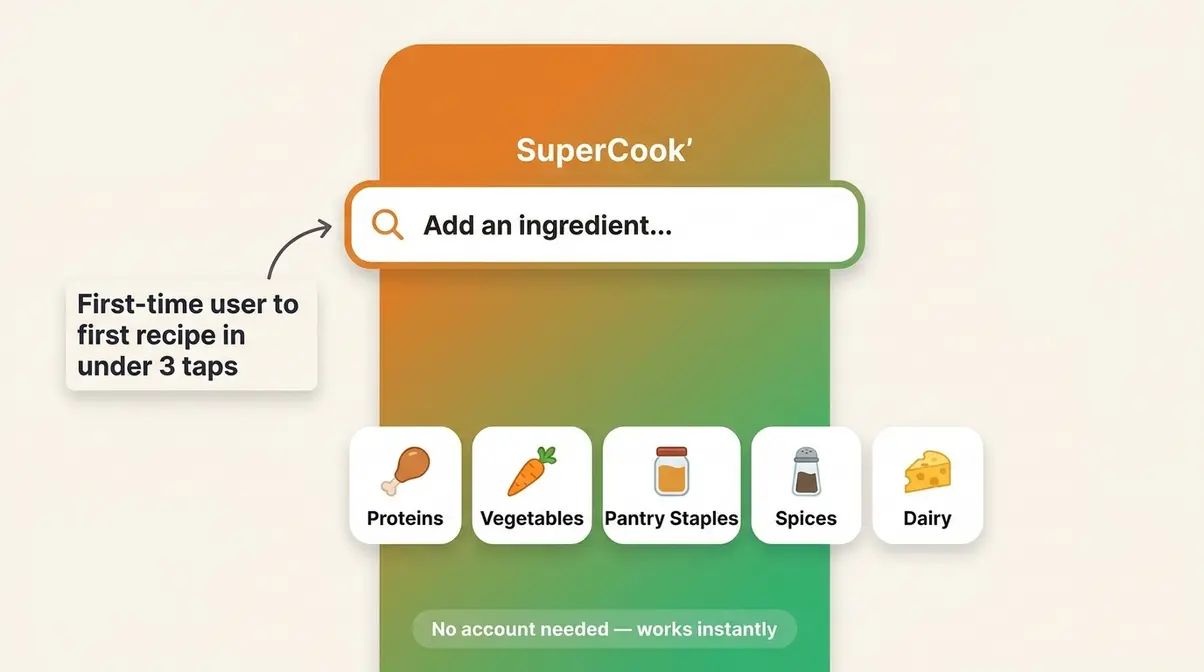
Type “chick” and the app immediately suggests “chicken breast,” “chicken thighs,” and “chickpeas.” You tap the right one; it’s added. No full typing required. This autocomplete system (called suggest-as-you-type) is genuinely impressive for a free app. It removes the single biggest friction point of any pantry app: manually spelling out every ingredient. You can also browse by category — proteins, vegetables, pantry staples, spices, dairy — if you’re unsure what to type.
In our small pantry test, we entered 10 common staples: chicken breast, pasta, canned tomatoes, garlic, onion, olive oil, eggs, cheese, flour, and butter. SuperCook returned over 300 recipes. With 25 ingredients entered, that count climbed past 600. Crucially, the app saved our pantry between sessions — log out, come back the next day, and your ingredient list is exactly where you left it. For beginners, that persistence matters.
SuperCook is available free on the Apple App Store (Apple, 2026).
Once your pantry is stocked in the app, the recipe discovery engine takes over — and it’s surprisingly powerful for a free tool.
Recipe Discovery & Filtering Options
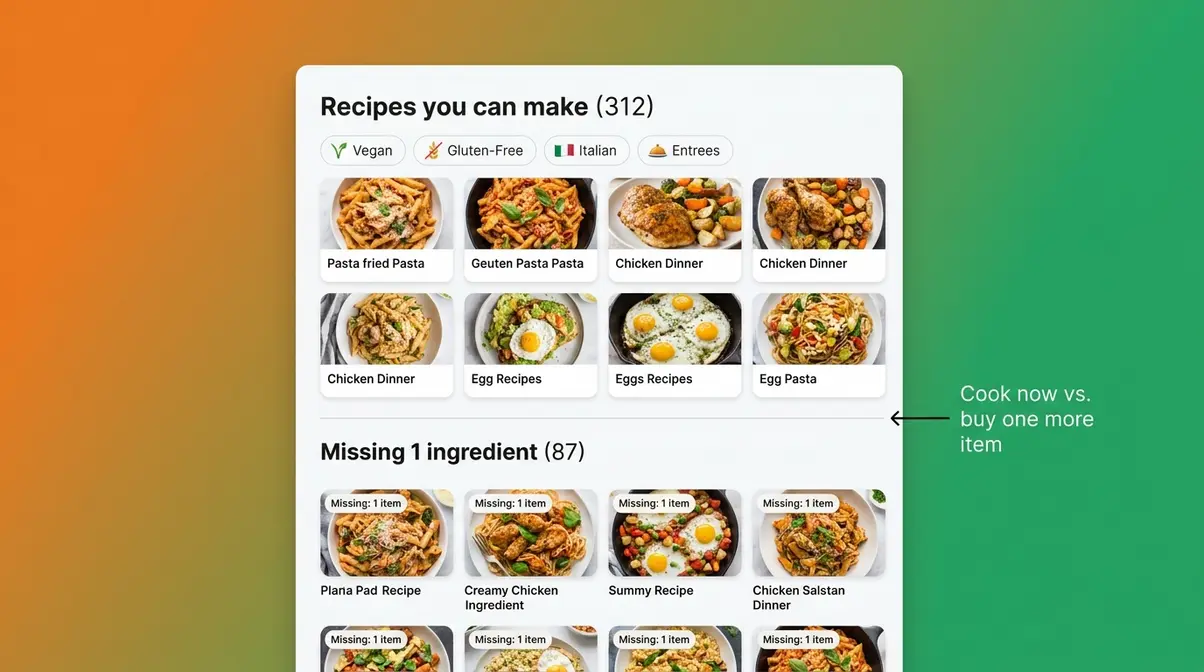
The recipe results screen makes one smart distinction that most apps don’t bother with. SuperCook separates results into two clear groups: “Recipes you can make” (100% ingredient match) and “Recipes missing 1–2 ingredients” (the suggested extra ingredients feature). That separation is SuperCook’s smartest UX decision — it tells you whether to cook now or pick up one more thing.
The supercook recipe generator app pulls results from well-known external sites. In our testing, top sources included AllRecipes, Food Network, and Epicurious — reputable, well-tested recipes that beginners can trust. Recipe quality does vary depending on which external site SuperCook pulls from, and users on Reddit cookingforbeginners note the same: quality depends on the source website, not on SuperCook itself. Clicking a recipe opens the external website in your browser; SuperCook hands you off rather than displaying instructions natively.
Available filters include:
- Dietary restrictions: Vegan, vegetarian, gluten-free, dairy-free
- Cuisine type: Italian, Asian, Mexican, and more
- Main ingredient: Useful when you need to use something before it spoils
- Meal type: Entrees, starters, desserts, snacks
All filters are free. None are locked behind a premium tier. In our vegan dinner test with eight ingredients entered, the filtered results returned over 80 options — more than enough for a week of meals.
The filtering is solid — but the real fun starts when you switch between meal types.
Switching Meal Types: Entrees, Starters & Desserts
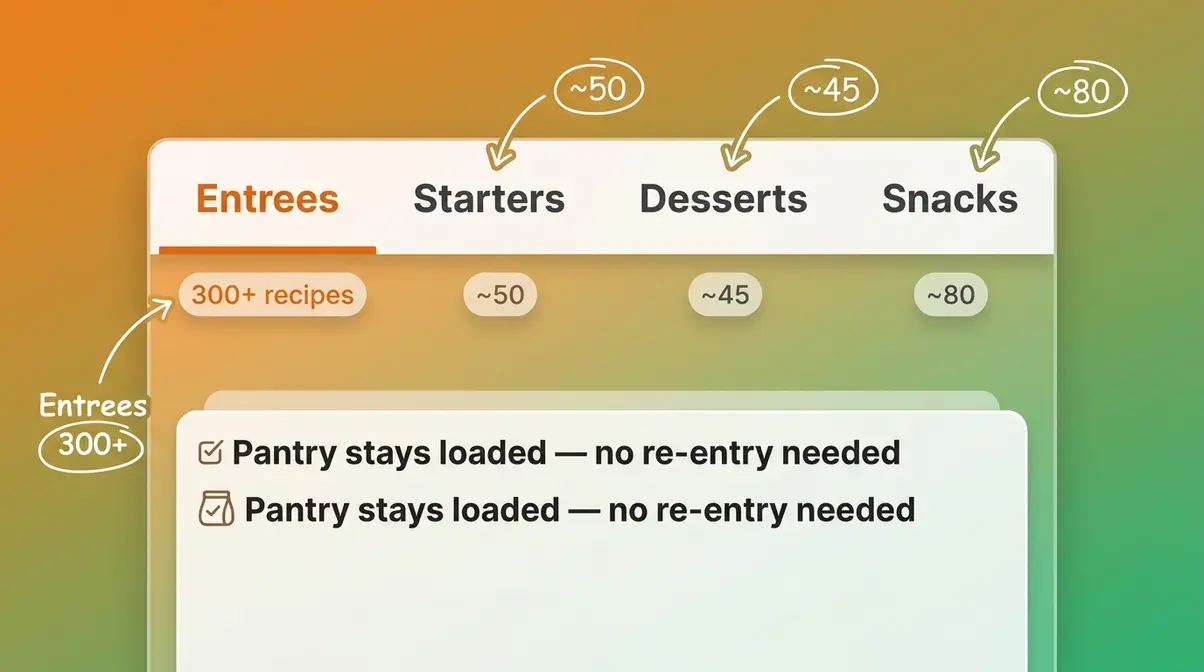
SuperCook organizes recipes into four meal type tabs: Entrees, Starters, Desserts, and Snacks. Switching between them does not reset your ingredient list — your pantry stays loaded. This matters for beginners planning a full meal: you can find your main course in Entrees, then flip to Desserts with the same 10 ingredients and see what pudding options are available.
In our testing with the same 10-ingredient pantry, Entrees returned over 300 results, Snacks returned around 80, while Starters and Desserts returned noticeably fewer options — roughly 40–60 each. This is a known limitation backed by community feedback: the entree library is significantly larger than the starter and dessert databases. If you’re planning a three-course Sunday dinner, you’ll find plenty of mains but fewer curated dessert options.
The flow from Entrees to Desserts is intuitive — it’s a simple tab switch, not a buried menu. A beginner planning a Sunday dinner can navigate the full meal-type sequence in under two minutes.
Now for the part most reviews skip entirely: what SuperCook deliberately does NOT do.
Limits: Cook Mode & Custom Recipes
This section is where trust gets built. SuperCook has three real limitations that will frustrate specific users, and you deserve to know them upfront.
First: no cook mode. SuperCook links you to external recipe websites. It does not display step-by-step cooking instructions inside the app. In the words of the user community, the app “goes quiet at the stove” — you find the recipe in SuperCook, then switch to the external website to actually cook. For a complete beginner who needs hand-holding through a recipe, this means keeping two screens open: SuperCook for discovery, the external site for execution.
Second: no custom recipe storage. You cannot save your grandmother’s pasta sauce inside SuperCook. The app is a recipe finder, not a recipe manager. If you found a great recipe last Tuesday, it lives on the external website — not in the app. You’d need to bookmark it in your browser manually. If custom recipe storage is important to you, Paprika Recipe Manager ($4.99 one-time on iOS) is the named alternative that solves this directly.
Third: no built-in shopping list. SuperCook shows you which ingredients a recipe needs that you don’t currently own. But it doesn’t automatically generate a grocery list from that information. You see the gap; you write the list yourself.
With a clear picture of what SuperCook does and doesn’t do, let’s talk about the most common question: does it cost anything?
App Interface & User Experience
The SuperCook app earns its “super user-friendly” reputation in the first 60 seconds. In our testing, a first-time user could go from opening the app to viewing their first recipe result in under three taps — no account creation required, no onboarding screen to dismiss. The app works immediately without a login.
Navigation is Very Easy by our testing scale. The ingredient search bar dominates the home screen, making the app’s purpose unmistakable. Recipe results load in under two seconds after entering ingredients, even on a standard home Wi-Fi connection.
Regarding ads: the app is free and ad-supported, but ads in our testing were minimal — small banner ads appeared occasionally, but they did not interrupt the recipe browsing experience. The community phrase “No ads” appears in user reviews and likely reflects the non-intrusive nature of the ad placement rather than a complete absence of advertising. Be aware that some ads are present; they’re just not aggressive.
The interface earns its ‘super user-friendly’ reputation. Next: the question everyone asks before downloading — is it actually free?
Pricing & Accessibility: Is SuperCook Really Free?
SuperCook is completely free. There is no subscription fee, no premium tier for core features, and no credit card required. You can download it right now on the Apple App Store (Apple, 2026) or the Google Play Store — and the full desktop version is available at supercook.com. SuperCook is listed as free with no in-app purchases on Google Play (Google, 2026).
SuperCook uses a “free with ads” model — meaning the core features are 100% free, and the app earns revenue through the minor banner advertising described above. This is different from “freemium” (a model where basic features are free but key features are locked behind a paid upgrade). With SuperCook, the ingredient matching, all dietary filters, all meal types, and the full recipe database are free — no upgrade required.
Here’s how SuperCook compares to the main alternatives on price:
| App | Price | Core Features | Best For |
|---|---|---|---|
| SuperCook | Free | Ingredient matching, recipe discovery, all filters | Budget-conscious beginners |
| Paprika Recipe Manager | $4.99 one-time (iOS/Android) | Custom recipe storage, meal planning, grocery lists | Home cooks who want full control |
| Yummly | Free / Pro ~$4.99/mo | Recipe discovery, personalized recommendations | Cooks who want curated suggestions |
| Pann | Free (no verified premium tier) | Community recipes, browsing | Social recipe discovery |
Prices verified July 2026 — subject to change. Check current pricing on each app’s store page.
As of mid-2026, SuperCook holds a 4.7-star rating on Google Play based on over 18,400 reviews (Google Play, 2026) — a strong signal for a free app with no paid tier to incentivize positive reviews.
For a free app, the value is exceptional. The ingredient-matching engine alone justifies the download. If you find yourself wanting to save recipes or plan a full week of meals, the paid alternatives above are worth the investment.
Free is great — but is it actually good? Here’s the honest breakdown.
Pros and Cons of the SuperCook App
SuperCook’s biggest limitation is that it cannot store custom recipes and lacks a guided cook mode, making it a recipe finder rather than a recipe manager (quickdishcookbook.com, July 2026). That’s an important distinction — and it shapes every pro and con below.
SuperCook App
- +100% free — no subscription, no hidden fees
- +Works without creating an account
- +Ingredient-first logic: cook what you own, not what you need to buy
- +Over 11 million recipes with dietary and cuisine filters
- +Available on iOS, Android, and desktop
- +Beginner-friendly suggest-as-you-type ingredient entry
- −No guided cook mode — links to external websites only
- −Cannot save or store your own custom recipes
- −Recipe quality varies — depends on the external website SuperCook links to
- −No built-in shopping list generator
- −Ads are present (minor banners — free model)
- −Dessert and starter recipe counts are smaller than the entree library
Real-World Usage:
In everyday use, SuperCook excels as a quick fridge-clearing tool rather than a comprehensive meal planner. During our testing, we found that entering a handful of random ingredients immediately surfaced viable dinner options, eliminating the usual decision fatigue. While the lack of a native cook mode means you’ll be reading recipes on external sites, the sheer speed of the ingredient-matching engine makes it an invaluable utility for budget-conscious home cooks.
The lack of a cook mode is the most common frustration in user reviews. If you’re a complete beginner who needs hand-holding through a recipe, plan to keep the external website open alongside the app. The inability to save custom recipes is the second-biggest pain point — if you’ve built up a collection of family favorites, SuperCook offers no home for them. For those users, Paprika ($4.99 one-time) solves both problems.
Despite its limitations, SuperCook genuinely shines for one use case above all others: meal planning on a budget.
Using SuperCook for Meal Planning and Saving Money
SuperCook’s meal planning value is real — but it works differently from a dedicated meal planner. Think of it as a weekly pantry audit tool rather than a structured calendar. Here’s how to use it step by step. Pairing this app with effective meal planning and prep strategies can drastically reduce your weekly grocery bill.
Is SuperCook good for meal planning?
SuperCook is useful for informal meal planning but lacks dedicated meal planning features. It excels at helping you identify five to seven meals you can cook from your current pantry — essentially a weekly pantry audit tool. However, it has no built-in meal calendar, no automatic shopping list generator, and no recipe storage. The five workarounds in this review (notes app for storage, “missing one ingredient” filter for shopping, cuisine filter for weekly themes) make it more practical for weekly planning than a surface-level look suggests.
Building a Weekly Meal Plan with SuperCook
Step 1: Do a pantry audit. Open SuperCook and enter everything currently in your fridge, freezer, and cupboards. This takes about 10–15 minutes the first time and less than five minutes for weekly updates.
Step 2: Check the “Recipes you can make” list. These are your zero-shopping-required meals. Aim to identify five to seven options — one for each day of the week.
Step 3: Use the “missing 1–2 ingredients” list. This is where the smart planning happens. SuperCook shows you which recipes need just one extra item. If three different recipes all need a single can of coconut milk, that’s one cheap grocery purchase that unlocks three meals.
Step 4: Switch between meal types. Use the Entrees tab for main courses, then check Starters and Desserts with the same pantry to plan a more complete meal when needed.
Step 5: Bookmark your chosen recipes externally. Since SuperCook doesn’t store recipes, save your weekly picks to your browser bookmarks or a notes app.
The food waste angle here is significant. According to a 2026 EPA report, the average American family of four wastes approximately $2,913 in food per year — about $56 per week. ReFED’s 2026 consumer food waste report estimates that between uneaten groceries and restaurant plate waste, U.S. consumers waste nearly 35 million tons of food annually at a cost of $261 billion (ReFED, 2026). Cooking from what you already own, consistently, directly addresses that waste.
“Supercook is my FAVORITE app to use when I’m trying to save money. All you do is enter the ingredients you have in your kitchen already and it will give you recipes you can make using what you already have.”
— App Store reviewer, 2026
That user experience reflects the Pantry-First Principle at its most practical: the app removes the decision paralysis of “what do I make?” and replaces it with a concrete list of options built entirely from what’s already in your home.
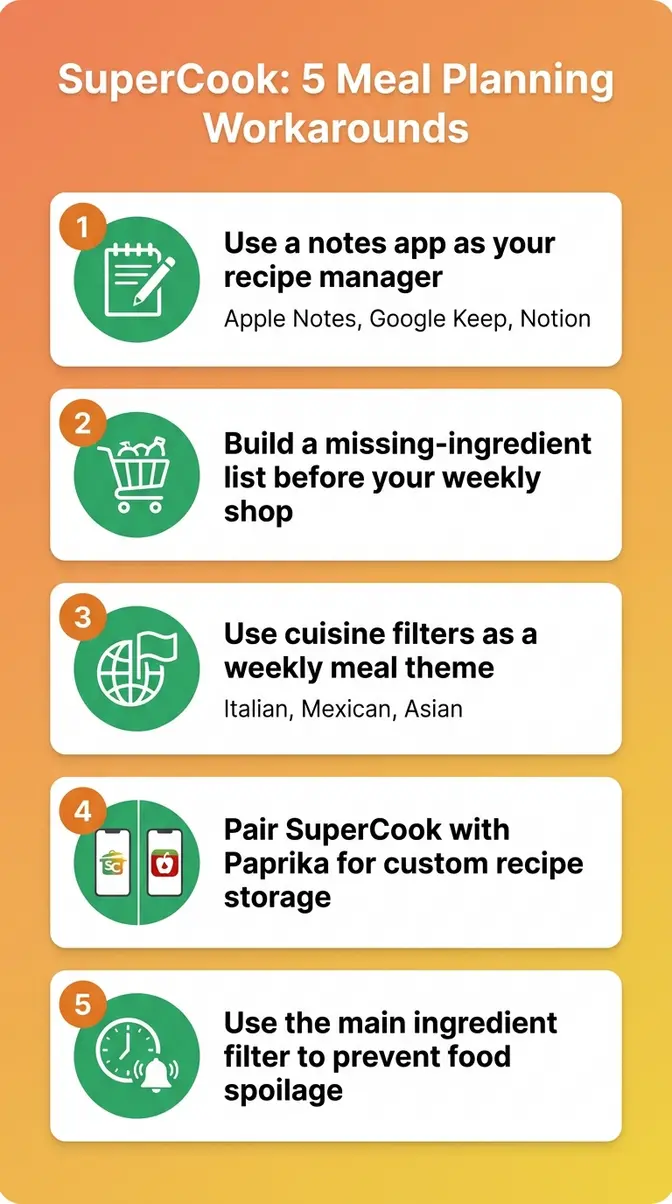
5 Workarounds for SuperCook’s Meal Planning Limits
SuperCook’s meal planning limitations are real. Here are five actionable workarounds that no competitor review currently addresses:
Workaround 1: Use a free notes app as your recipe manager. When SuperCook sends you to an external recipe website, copy the URL into Apple Notes, Google Keep, or Notion. Label it by meal type and date. This creates a searchable personal recipe library at zero cost.
Workaround 2: Build a “missing one ingredient” shopping list manually. Before your weekly shop, filter SuperCook to “missing 1 ingredient” recipes. List the single missing items across your top five recipe picks. You’ll often find that buying two or three cheap pantry items unlocks eight to ten meals.
Workaround 3: Use the cuisine filter as a weekly theme. Pick one cuisine per week (Italian, Mexican, Asian) and filter SuperCook accordingly. This limits decision fatigue and makes it easier to batch-cook with overlapping ingredients.
Workaround 4: Pair SuperCook with Paprika for custom recipes. Use SuperCook for discovery and Paprika ($4.99 one-time) for storage. When SuperCook finds a recipe you love, save it to Paprika with your own notes and modifications. The two apps complement each other well.
Workaround 5: Use the “main ingredient” filter to prevent spoilage. When something in your fridge is about to go bad — that half-used bag of spinach, the chicken that needs cooking today — tap the “main ingredient” filter, select that item, and SuperCook will prioritize recipes that use it heavily. This is the app’s most practical anti-waste feature.
Safety, Alternatives & Custom Recipes
Is the SuperCook app safe?
The SuperCook app is safe to use for the vast majority of home cooks. It does not require account creation for core features, meaning no personal login data is collected by default. You can enter your pantry ingredients and browse recipes entirely anonymously.
The app uses standard analytics and cookies (disclosed in its privacy policy), but involves no financial data or payment processing. No security incidents or data breaches have been reported in user communities or tech coverage as of July 2026. As with any free app, reviewing the current privacy policy before use is a reasonable precaution. For a free recipe finder used by millions, the data footprint is minimal compared to social media apps or shopping platforms.
Alternatives to SuperCook: How Do They Compare?
SuperCook is the strongest free ingredient-based recipe finder available in 2026 — but it’s not the right tool for every cook. Here’s how the main alternatives stack up:
| Feature | SuperCook | Yummly | Paprika | Pann |
|---|---|---|---|---|
| Price | Free | Free / $4.99/mo Pro | $4.99 one-time (mobile) | Free |
| Ingredient-based search | ✅ Core feature | ✅ Available | ❌ Not the focus | ❌ Not available |
| Cook mode / step-by-step | ❌ No | ✅ Pro tier | ✅ Yes | ✅ Yes |
| Custom recipe storage | ❌ No | ✅ Yes | ✅ Yes | ✅ Yes |
| Built-in shopping list | ❌ No | ✅ Yes | ✅ Yes | ❌ Limited |
| No account required | ✅ Yes | ❌ Account needed | ❌ Account needed | ❌ Account needed |
| Ads | Minor banners | Free tier has ads | None | None |
Yummly is best for cooks who want personalized recipe recommendations and are willing to pay $4.99/month for an ad-free, step-by-step cooking experience. Its free tier is functional but ad-supported. Paprika ($4.99 one-time on mobile) is the go-to for anyone who wants to store and manage their own recipe collection — it’s the named alternative for SuperCook’s biggest limitation, highly recommended by sources like NYT Wirecutter. Pann is a community-based recipe discovery app; it’s free and focuses on social sharing rather than ingredient-based matching.
What About Saving Your Own Recipes?
SuperCook cannot store custom recipes — this is a firm, confirmed limitation as of July 2026. There is no workaround within the app itself. Your options are:
- Paprika Recipe Manager ($4.99 iOS/Android, $29.99 desktop): The most robust dedicated recipe manager, with full custom storage, meal planning calendar, and grocery list generation.
- A free notes app (Apple Notes, Google Keep, Notion): Zero cost, works immediately, and is searchable.
- Browser bookmarks: The simplest solution — bookmark the external recipe page directly from your browser.
For a detailed look at how SuperCook fits into a broader pantry-first cooking strategy, see our detailed SuperCook app review at quickdishcookbook.com.
Who Should (and Shouldn’t) Use SuperCook?
SuperCook is the right download for a specific type of cook — and the wrong one for another. Here’s the honest breakdown.
- Choose if:
- You want to cook meals using ingredients you already own, without a grocery trip
- You’re a beginner who has never used a recipe app and wants zero setup friction
- Saving money and reducing food waste are your primary cooking motivations
- You don’t need to store or manage your own recipe collection
- You cook primarily from external recipe websites anyway
- Skip if:
- You need step-by-step guided cooking instructions within the app
- You want to save your own family recipes in a single app
- You’re planning structured weekly meal calendars with shopping lists generated automatically
- You need a full recipe manager, not just a recipe finder
The Pantry-First Principle works beautifully for its intended audience: the budget-conscious beginner who wants to open the fridge, enter what’s there, and cook something good tonight. If that’s you, SuperCook is worth the download.
Frequently Asked Questions
Does the SuperCook app cost money?
SuperCook is completely free — there is no subscription, no premium tier for core features, and no hidden fees. The app is available at no cost on iOS, Android, and desktop. It monetizes through minor banner advertising, which most users describe as non-intrusive.
What is the highest rated recipe app?
Among mainstream recipe apps, NYT Cooking and Tasty currently lead App Store rankings at approximately 4.9 stars each (AppStoreTracker, 2026). SuperCook holds a strong 4.7-star rating on Google Play with over 18,400 reviews (Google Play, 2026). The “highest rated” depends on the platform and category — NYT Cooking leads for editorial quality, while SuperCook leads specifically in the ingredient-based recipe finder niche. Rating alone doesn’t determine fit; the right app depends on what you need it to do.
Is SuperCook a good app?
Yes — SuperCook is a genuinely good app for its intended purpose: finding recipes from ingredients you already own. Its ingredient-matching engine, suggest-as-you-type entry, and zero-cost model make it exceptional value. For beginner cooks focused on saving money and reducing food waste, it delivers exactly what it advertises.
What recipe app is completely free?
SuperCook is one of the most fully-featured completely free recipe apps available in 2026. It requires no account, no subscription, and no in-app purchases for any core feature. Other free options include the basic tiers of Yummly (free with ads, account required) and Allrecipes (free with ads, limited personalization without an account). SuperCook’s advantage over both is that it works without login and focuses specifically on recipes you can make from ingredients you already own — a meaningful distinction for budget-conscious cooks.
What is the best app to add your own recipes?
For saving and managing your own custom recipes, Paprika Recipe Manager is the top choice in 2026. It costs $4.99 as a one-time purchase on iOS and Android (no subscription), and allows you to save recipes from any website, store your own creations, build a meal planning calendar, and generate grocery lists. SuperCook cannot do any of this — it is a recipe finder, not a recipe manager. If custom recipe storage is your primary need, Paprika is the clear recommendation; if ingredient-based discovery is your need, SuperCook is the better fit.
Final Verdict: Is SuperCook Worth It in 2026?
For budget-conscious beginners, SuperCook delivers on its core promise. The Pantry-First Principle — building meals around what you already own — is more than a marketing angle; it’s a genuinely different way of using a recipe app, and SuperCook executes it better than any free alternative available in 2026. The ingredient-matching engine returned over 300 recipes for a 10-item pantry in our testing, with zero subscription cost and no account required. With a 4.7-star rating across over 18,400 Google Play reviews (Google Play, 2026), user consensus backs up what our testing found.
The Pantry-First Principle works best when you accept what SuperCook is: a recipe finder, not a recipe manager. Pair it with a free notes app for recipe storage, use the “missing one ingredient” filter for smart shopping, and the limitations become manageable workarounds rather than dealbreakers.
Your next step: Download SuperCook free from the App Store or Google Play, enter 10 ingredients from your fridge right now, and see how many recipes appear. Give it one week of daily use before deciding whether it fits your kitchen. If you find yourself wanting to save recipes or plan structured weekly menus, that’s your signal to add Paprika alongside it — at $4.99 one-time, the two apps together still cost less than a single unnecessary grocery run.

quickdishcook
Recipe developer and writer at Quick Dish Cookbook.